


Interactive Web Architecture Simulator
Explore the web development ecosystem. Select a scenario below to see how different technologies interact between the Client (Browser) and the Server.
When you visit a website, your browser requests the files. The server sends HTML, CSS, and JS. Your browser renders them to create what you see. No complex logic happens yet.
You’ve probably heard the term "full-stack" thrown around a lot. It sounds impressive, doesn’t it? But if you’re just starting out, or even if you’ve been coding for a while, there’s one fundamental question that trips people up: Is HTML front-end or back-end? It seems like a simple yes-or-no question, but the reality is a bit more nuanced because modern web development blurs these lines.
Here is the short answer: HTML is primarily a front-end technology. It lives in the browser, it controls what users see, and it structures the content they interact with. However, understanding *why* it sits on the front end-and how it sometimes touches the back end-is crucial for building websites that actually work.
Quick Summary: What You Need to Know
- HTML is Front-End: It runs in the user's browser (client-side) and defines the structure of web pages.
- It Needs Partners: HTML alone is static; it needs CSS for style and JavaScript for interactivity.
- The Back-End Connection: While HTML is front-end, back-end servers generate HTML dynamically before sending it to your browser.
- No Logic Inside: HTML has no computational power; it cannot process data, connect to databases, or handle security.
What Exactly Is the Front End?
To understand where HTML fits, we first need to define the front end. Think of the front end as the part of the website you can actually touch, click, and scroll through. In technical terms, this is the Client-Side, which refers to the user's device and browser where the web page is rendered.
When you type a URL into Chrome, Firefox, or Safari, your browser sends a request to a server. That server sends back code. The front end is everything that happens *after* that code arrives in your browser. Your browser reads the instructions and paints pixels on your screen. This process is called rendering.
The front end consists of three core technologies:
- HTML (HyperText Markup Language): The skeleton. It tells the browser what elements exist (headings, paragraphs, images).
- CSS (Cascading Style Sheets): The skin and clothes. It determines colors, fonts, spacing, and layout.
- JavaScript: The muscles and nervous system. It handles interactions, animations, and dynamic updates without reloading the page.
Since HTML is responsible for structuring the visual content that appears directly in the user’s interface, it is undeniably a front-end technology. If you open any webpage and right-click to select "View Page Source," you are looking at the raw HTML. That source code is living entirely within your browser environment.
Why HTML Is Not Back-End
If HTML is front-end, what makes something back-end? The Back-End is the server-side logic, databases, and application infrastructure that powers the website behind the scenes. Back-end code runs on a remote computer (the server), not on your laptop or phone.
HTML lacks several critical capabilities that define back-end technologies:
- No Database Access: HTML cannot talk to a database. It can’t save a user’s password, retrieve a product list from inventory, or store comments. For that, you need languages like Python, PHP, Node.js, or Ruby.
- No Server Logic: HTML doesn’t make decisions. It can’t say, "If the user is logged in, show this button; otherwise, hide it." That conditional logic requires a back-end language.
- No Security Control: Because HTML is sent to the client (your browser), anyone can view it. You can’t put sensitive information, like API keys or database credentials, inside an HTML file. They would be exposed to everyone.
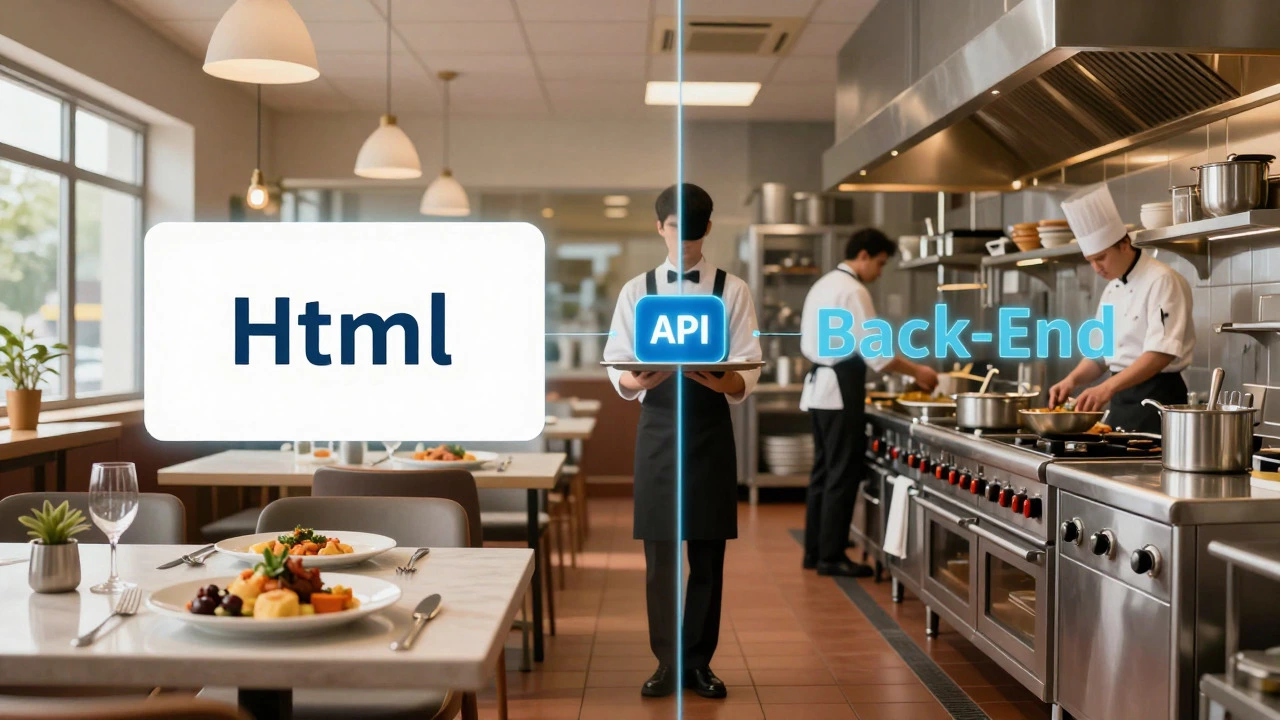
Imagine a restaurant. The front end is the dining room-the tables, the menu, the food presentation. The back end is the kitchen-the chefs, the stove, the storage pantry. HTML is the plate and the arrangement of the food. It looks good and holds the meal, but it doesn’t cook anything. It doesn’t chop vegetables or manage the supply chain. That’s the job of the back end.
The Gray Area: When HTML Touches the Back End
So, if HTML is strictly front-end, why do some developers get confused? The confusion usually comes from how HTML is *generated*. While the final HTML file lives in the browser, it often starts its life on the server.
This is known as Server-Side Rendering (SSR), which is a technique where the back-end server generates the complete HTML document before sending it to the client. Let’s look at how this works with a common example.
Suppose you’re building a blog using WordPress. WordPress is built with PHP, a server-side scripting language designed for web development. When you visit a post, here’s what happens:
- Your browser requests the URL.
- The server receives the request and wakes up the PHP engine.
- PHP connects to the MySQL database to fetch the article title, content, and author.
- PHP takes a template file (which contains HTML) and injects the data from the database into it.
- The server sends the resulting pure HTML back to your browser.
In this scenario, the developer writes HTML templates. These templates live on the server. But once they reach your browser, they are no longer "PHP files." They are just HTML. The back end did the heavy lifting-fetching data and assembling the structure-but the final product delivered to the user is front-end HTML.
This distinction is vital. Just because you write HTML inside a PHP file or a React component doesn’t make HTML a back-end language. It remains the output format, the universal language that browsers understand.
Comparison: Front-End vs. Back-End Technologies
To clear up any remaining doubt, let’s compare the tools used in each layer. Notice where HTML sits.
| Feature | Front-End (Client-Side) | Back-End (Server-Side) |
|---|---|---|
| Primary Languages | HTML, CSS, JavaScript | Python, PHP, Java, Node.js, C# |
| Execution Location | User’s Browser | Remote Server |
| Main Responsibility | UI/UX, Layout, Interactivity | Data Processing, Security, Business Logic |
| Database Interaction | Indirect (via APIs) | Direct (SQL, NoSQL) |
| Visibility | Visible to Users (View Source) | Hidden from Users |
| Example Frameworks | React, Vue, Angular, Bootstrap | Django, Laravel, Express, Spring Boot |
As you can see, HTML shares the table with CSS and JavaScript. None of these three have direct access to databases or server resources. They rely on the back end to provide data through APIs (Application Programming Interfaces). An API acts like a waiter, taking orders from the front end (HTML/JS) and bringing back food (data) from the kitchen (Back End).
Common Misconceptions About HTML
Even experienced developers sometimes mix up these concepts. Here are three common myths I hear all the time.
Myth 1: "HTML5 added video and audio tags, so it must be powerful enough to be back-end."
Not true. The <video> tag simply tells the browser to play a media file. It doesn’t encode the video, stream it efficiently, or manage bandwidth. Those tasks are handled by media servers and protocols like HLS or DASH. HTML just provides the player interface.
Myth 2: "I use HTML forms to submit data, so HTML processes the data."
Forms collect input, yes. But when you click "Submit," the HTML form hands that data off to a back-end script via HTTP POST or GET requests. The HTML itself does nothing with the data after it leaves the browser. It doesn’t validate email formats securely, nor does it send the confirmation email. That’s all server-side logic.
Myth 3: "Static Site Generators (SSGs) make HTML back-end."
Tools like Jekyll, Hugo, or Gatsby run during the build process. They take markdown files and HTML templates and compile them into static HTML files. This compilation happens on your machine or a CI/CD server. But the result? Still static HTML files served to the browser. The *process* of generation might involve back-end-like steps, but the artifact (HTML) remains front-end.

How HTML Works With Other Layers
Understanding HTML’s role requires seeing it as part of a team. It rarely works alone. Let’s break down the typical flow of a modern web application.
1. The Structure (HTML): You create a form with fields for name and email. You use semantic tags like <form>, <input>, and <label>. This ensures accessibility and proper structure.
2. The Style (CSS): You add styles to make the form look inviting. You align the inputs, choose readable fonts, and ensure it works on mobile devices. This enhances the user experience but doesn’t change functionality.
3. The Behavior (JavaScript): You add JavaScript to validate the email field instantly. If the user types "test@", JS shows an error message without talking to the server yet. This improves responsiveness.
4. The Submission (API Call): When the user clicks submit, JavaScript gathers the data and sends it to a back-end endpoint (e.g., /api/register). This is where the handoff happens.
5. The Processing (Back-End): The server receives the JSON data. A back-end framework (like Express.js or Django) validates the data again (never trust the client!), checks if the email exists in the database, hashes the password, and saves the new user record.
6. The Response: The server sends back a success message. JavaScript receives this and updates the HTML DOM to show "Registration Successful!"
In this entire chain, HTML is the canvas. It presents the initial state and reflects the final state. But the action, the logic, and the data persistence happen elsewhere.
Should You Learn Back-End After HTML?
If you’re asking whether HTML is front-end or back-end, you’re likely planning your learning path. Here’s my advice based on industry standards in 2026.
Master the front-end triad first: HTML, CSS, and JavaScript. You cannot build a functional website without these. Specifically, focus on semantic HTML. Writing clean, accessible HTML is a skill that separates juniors from seniors. Many developers rush to learn React or Vue before they understand how a basic <nav> or <article> tag should be structured. Don’t make that mistake.
Once you’re comfortable manipulating the DOM with JavaScript, you’ll naturally hit a wall. You’ll want to save data. You’ll want to authenticate users. That’s when you dip your toes into the back end. Start with a lightweight backend framework like Node.js (since you already know JavaScript) or Python (for its readability). Understanding how the back end generates or responds to HTML will give you a complete picture of web architecture.
Remember, being a "Full Stack Developer" doesn’t mean you know every detail of every layer. It means you understand how they connect. Knowing that HTML is the bridge between the server’s data and the user’s eyes is half the battle.
Final Thoughts on HTML’s Role
So, is HTML front-end or back-end? It is unequivocally front-end. It is the language of the browser. It is the visual contract between the website and the user. While it may be generated by back-end systems, its execution, interpretation, and purpose reside entirely on the client side.
Don’t let the complexity of modern frameworks confuse you. Whether you’re using plain HTML, server-side rendered templates, or client-side single-page applications, the HTML that reaches the viewport is always front-end code. Keep your mental model clear: HTML structures, CSS styles, JavaScript behaves, and the back end powers.
Can HTML run on a server?
No, HTML itself does not "run" or execute logic on a server. Servers serve HTML files to clients. However, server-side languages like PHP or Python can generate HTML dynamically before sending it. The HTML file is static markup; it has no executable code.
Is JavaScript front-end or back-end?
JavaScript is unique because it can be both. Traditionally, it is a front-end language running in the browser. However, with Node.js, JavaScript can also run on the server as a back-end language. Despite this versatility, HTML remains strictly front-end.
Do I need to know HTML to work on the back end?
Yes, a basic understanding is essential. Even if you only write API endpoints, you need to understand what the front end expects. Knowing HTML helps you design better data structures and debug issues related to how data is rendered in the browser.
What is the difference between client-side and server-side rendering?
In client-side rendering (CSR), the server sends a blank HTML shell and JavaScript bundles. The browser then uses JavaScript to fetch data and build the UI. In server-side rendering (SSR), the server builds the full HTML with data included and sends it to the browser. SSR is faster for initial load and better for SEO, while CSR offers smoother app-like experiences.
Can HTML store data?
Not permanently. HTML can hold temporary data in attributes (like data-* attributes) or within form inputs, but this data disappears when the page reloads. For persistent storage, you need databases (back-end) or local storage/session storage (browser-based JavaScript features).
Why is semantic HTML important?
Semantic HTML uses tags that describe their meaning (e.g., <header>, <footer>, <article>) rather than just appearance (e.g., <div>). This improves accessibility for screen readers, helps search engines understand your content (SEO), and makes your code easier to maintain and collaborate on.
Is XML front-end or back-end?
Like HTML, XML is a markup language, but it is not typically rendered directly in browsers for display. It is often used for data exchange between systems (back-end to back-end) or configuration files. However, when used in AJAX calls or RSS feeds consumed by front-end apps, it serves as a data transport format rather than a UI layer.